Ragdoll Soccer Guides Hub
Physics soccer tutorials for 4v4, 8v8 Pro, Clubs, Practice, goalkeeper, and advanced tips — start here and branch into every how-to.
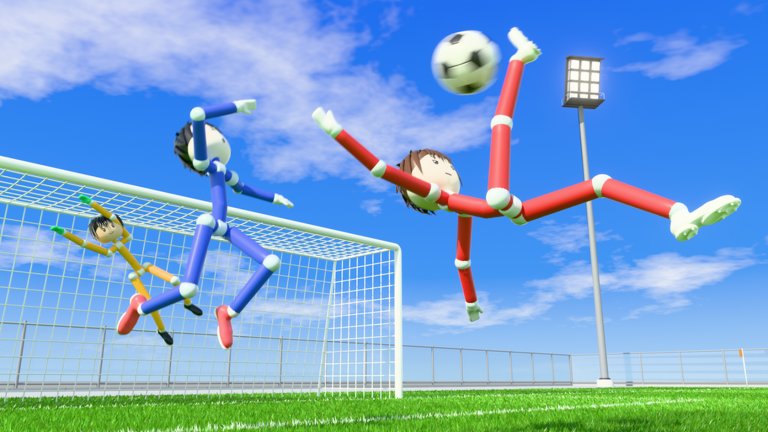
Welcome to the Guides Hub for Ragdoll Soccer by Ragdoll Athletics. This Roblox physics soccer experience has been in early development since 13 October 2026, and the learning curve is different from standard Roblox sports games: your avatar is a floppy ragdoll body, and almost every kick, tackle, dive, and rebound comes from collision timing rather than a simple power meter.
Use this hub as the map of every tutorial on the wiki. New players should start with Getting Started, then learn Controls, skim Game Modes, and finish with How to Score. From there, specialize into the Goalkeeper guide, run better friend nights with Clubs Mode, and sharpen intermediate habits on Tips and Tricks. Veterans can jump straight to mode rules, finishing, or keeper play, then cross-check the tier list, players, and updates hubs for meta and patch context.
Who these guides are for
- Brand-new players who just clicked Play and want a calm first session
- Friends groups planning Clubs nights and need a shared vocabulary for roles
- Goalkeepers adapting to the post-update claim-and-position playstyle
- Competitive players moving from casual 4v4 into 8v8 Pro servers with referees, penalties, free kicks, throw-ins, VAR, and offsides
- Returning players after a patch who need a refresher on modes, scoring, and keeper habits
Ragdoll Soccer rewards patience. The ball does not always go where a button-mash expects it to. The guides below teach you how to use Practice mode, read on-screen prompts, and build muscle memory for physics-driven plays instead of copying keybinds from unrelated ragdoll sports titles.
Guide index
Getting Started
Day-one checklist: join the experience, claim the WELCOME code for 250 Coins through the shop Codes tab, warm up in Practice, then queue 4v4 quickplay. Covers early coin habits, what to ignore in your first hour, and how to avoid frustration when bodies flop into hilarious (but useful) chaos. Featured for new visitors.
Controls
Movement basics for PC, mobile, and console using standard Roblox locomotion (WASD + jump on keyboard). Soccer actions — kicks, tackles, dives — are driven by physics collisions and timing, not a published American-football-style keybind sheet. Includes camera tips, Practice drills, and honest notes when the developer has not published exact soccer action bindings.
Game Modes
Deep dive into 4v4 quickplay, 8v8 Pro (referees, set pieces, VAR, offsides), Clubs (4v4 with friends), and Practice. Explains when to play each mode, what rules change in Pro, and how Clubs differs from public quickplay so your group picks the right lobby every time.
How to Score
Finishing guide: timing kicks, simple passes, using ragdoll chaos as an advantage, and converting messy rebounds into goals. Ideal after you understand movement and modes. Featured for players stuck at 0–1 goals per match.
Goalkeeper
Post-update keeper play: angle cutting, claiming the box, talking to defenders, Practice save/claim drills, 4v4 vs 8v8 Pro habits, and Clubs rotation so one friend is not stuck in gloves forever. Includes a mid-article goalkeeper update comparison video for visual context. Featured for players volunteering (or getting volunteered) between the posts.
Clubs Mode
Friends-first 4v4 nights: pre-match role assignment (finisher / linker / defender / keeper), chemistry checklists, callouts, redeeming WELCOME before kickoff, shared Practice warm-ups, how Clubs differs from public quickplay and from Pro, and composure habits when a teammate leaves mid-match. Featured for group session planners.
Tips and Tricks
Intermediate toolkit: camera discipline, soft vs hard contacts on purpose, rebound hunting, Pro offside awareness, set-piece readiness, tilt control, Practice micro-drills, coin economy habits, and when to queue each mode. Links the whole guide family so you can stack skills instead of rereading the same beginner page. Includes a community RFX-comparison vibe clip (fan energy, not an official crossover).
Suggested learning path
- Open Getting Started and claim codes (start with WELCOME; see how to redeem).
- Spend ten to fifteen minutes in Practice while reading Controls.
- Play two or three 4v4 matches before touching Pro rules — then read Game Modes.
- Study How to Score and replay Practice focusing only on finishing.
- If you are playing gloves or Clubs nights, add Goalkeeper and Clubs Mode next.
- When basics feel automatic, graduate to Tips and Tricks for camera, rebounds, Pro set pieces, and tilt rules.
- Browse the roles tier list and tier list hub once you care about positioning.
- Bookmark updates so post-patch changes do not surprise you, and keep wiki links, scripts, and tools handy for extras.
How this wiki stays useful during early development
Because Ragdoll Soccer is still early in development, menus, coin sinks, keeper feel, and Pro enforcement can shift. Guides emphasize stable systems: physics feel, mode intent, Practice habits, keeper positioning principles, Clubs chemistry, and redemption flow for published codes. When something is not officially documented (exact kick key on every platform, for example), we say so and point you to Practice and on-screen prompts instead of inventing controls.
Cross-link often. The players hub helps you think about teammates; scripts and tools are optional side resources — never required to enjoy fair matches. If you only read a short stack on this site, make them Getting Started → Controls → Game Modes → How to Score, then add Goalkeeper or Clubs when your group needs them, and return here whenever you need the overview again.
Quick tips before you queue
- Warm up in Practice even if you “already know soccer.” Ragdoll limbs change everything.
- Treat the first collisions as experiments: approach angle and timing matter more than spam.
- Claim WELCOME early so you have 250 Coins for shop browsing while you learn.
- Prefer 4v4 until you understand spacing; 8v8 Pro adds rules that punish chaotic positioning.
- Rotate keeper in Clubs — do not trap one friend in the net all night.
- Watch one mid-article guide video when available (scoring clips, keeper update comparison, Clubs grit, or community vibe pieces), then immediately try the same idea in Practice.
- When you feel stuck, open Tips and Tricks and pick a single habit for the next match only.
When you finish a guide, jump to a sibling page from the same category so knowledge stacks. Scoring tips make more sense after controls; Pro mode makes more sense after a few casual 4v4 games; keeper claims make more sense after you understand how finishers create rebounds; Clubs chemistry makes more sense after everyone shares the same callouts. That is the design of this hub — short hops, clear next steps, and zero dead ends.
Frequently Asked Questions
Quick answers for Ragdoll Soccer players.
Which Ragdoll Soccer guide should I read first?
Start with Getting Started for join steps, the WELCOME code, Practice, and your first 4v4. Then open Controls, Game Modes, and How to Score. Add Goalkeeper, Clubs Mode, or Tips and Tricks when those topics match your next session.
Are these guides for PC only?
No. Movement follows standard Roblox controls on PC, mobile, and console. Soccer actions are physics-driven; use Practice and on-screen prompts on your device.
What is the difference between 4v4 and 8v8 Pro?
4v4 quickplay is the casual entry point. 8v8 Pro adds referees, penalties, free kicks, throw-ins, VAR, and offsides. Read the Game Modes guide before your first Pro server.
Where do I redeem the WELCOME code?
Open the in-game shop, go to the Codes tab, and enter WELCOME for 250 Coins. See the Codes hub and How to Redeem pages for the full steps.
Which guides help with Clubs nights and goalkeeper play?
Use the Clubs Mode guide for roles, callouts, warm-ups, and short-handed composure. Use the Goalkeeper guide for positioning, claims, Practice drills, and rotating gloves so one friend is not stuck forever.
Will guides change as the game updates?
Yes. Ragdoll Soccer is in early development since October 2026. Check the Updates hub after patches, and treat physics habits as the most stable advice.