Ragdoll Soccer Controls & Physics Timing
Learn movement, camera, and collision timing honestly — no copied American-football keybinds presented as official soccer binds.
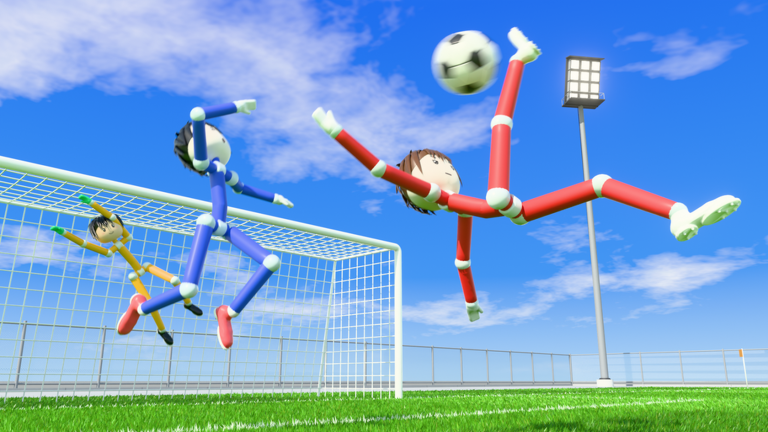
Controls in Ragdoll Soccer are easy to misunderstand because the fantasy looks like a traditional sports title while the feel is pure Roblox physics. Your character is a ragdoll body. Walking uses familiar Roblox locomotion. Kicking, tackling, and diving are mostly the result of how and when you collide with the ball or another player — not a hidden list of American-football special moves pasted into a soccer pitch.
This guide covers PC, mobile, and console basics, camera habits, Practice drills, and clear honesty about unpublished binds. Pair it with Getting Started, then apply the habits in How to Score and pick modes via Game Modes.
Core principle: locomotion vs soccer actions
Split the control problem into two layers:
- Locomotion — move, jump, look. This follows standard Roblox controls for your device.
- Soccer actions — influence the ball and opponents through physics-driven collisions and timing. Approach angle, speed, and contact moment matter more than mashing a mystery key.
If a creator video shows flashy ragdoll plays, treat it as inspiration for timing, not as proof of an official bind sheet. Do not copy Ragdoll Football (American football) keybinds and assume they are official for this soccer experience. When the developer publishes clearer action binds later, this wiki will update; until then, Practice and on-screen prompts are the source of truth.
PC controls (keyboard & mouse)
On PC, expect the usual Roblox desktop layout:
- W A S D — move
- Space — jump
- Mouse — look / camera
- Shift (if enabled in Roblox) — sprint behavior depending on experience settings
Soccer influence comes from steering your ragdoll into the ball with intent. Soft approaches create passes and carries; harder, later contacts can blast shots or wild clearances. Jump timing can change whether you meet the ball in the air or belly-flop past it. After any flop, stop spamming directions for a beat, re-center the camera on the ball, then move again.
Recommended PC habits:
- Keep sensitivity moderate so you can track a bouncing ball without over-rotating.
- Strafe around the ball instead of always charging straight through it.
- Use short WASD taps near the ball for fine positioning.
- Jump only when you have a reason (header-like contact, hurdle a dive) — random jumps create more faceplants than goals.
Mobile controls
Mobile uses Roblox’s on-screen thumbstick and jump button. Soccer still depends on collision timing:
- Move with the left stick area; look by dragging the camera region.
- Approach the ball in curves rather than panic sprints into your own feet.
- After a ragdoll tumble, wait until your avatar stabilizes before steering again.
- Watch for on-screen prompts the experience shows during Practice or matches — those beat guesswork.
Mobile tip: play a few Practice minutes in landscape with a stable grip. Accidental camera flicks are the number-one cause of “I swear I touched it” misses on phones.
Console controls
Console players use the standard Roblox gamepad mapping for movement and camera:
- Left stick — move
- Right stick — look
- Face / shoulder buttons — jump and Roblox defaults as bound by the client
As with PC and mobile, treat soccer outcomes as physics results. If a prompt appears in-game, follow it. If friends claim a secret bind from another ragdoll sports title, verify in Practice before trusting it in a Pro match.
Camera: the hidden skill
You cannot time collisions you cannot see. Camera mistakes look like “bad controls.”
- Keep the ball and nearby teammates in frame when possible.
- When you flop, reorient first, then sprint. Sprinting while face-down just digs the comedy deeper.
- On PC, micro-adjust the mouse while strafing so the ball stays near screen center during dribbles.
- On mobile/console, avoid yanking the look stick during contact frames.
Good camera work makes scoring feel fair; bad camera work makes every rebound feel random.
Physics timing drills (Practice mode)
Open Practice from the mode list and run these drills. They teach the real “controls” of Ragdoll Soccer better than any invented key chart.
Drill A — Soft touch lane
Place yourself behind a still ball. Walk into it slowly from behind. Goal: nudge it 2–4 body lengths without spinning out. Repeat from 45-degree angles. This builds pass-like touches for 4v4.
Drill B — Stop-and-face
Sprint past the ball, stop, turn the camera to face it, then approach again. Teaches recovery composure after overruns — common in chaotic midfields.
Drill C — Jump contact window
Approach a rolling ball and jump slightly before contact. Note whether you get a useful loft or a useless belly slide. Adjust earlier/later by tiny amounts. Record what your device feels like; do not chase a universal frame count.
Drill D — Tackle-shaped collisions
Without intending grief, practice shoulder-to-shoulder approaches on empty space near the ball. Learn how easily ragdolls tangle. In real matches, late desperate dives often concede fouls in 8v8 Pro (see Game Modes).
Drill E — Goal-mouth finishing
From the edge of the box area, take ten composed contacts toward goal. Count clean hits vs flails. Then read How to Score and repeat.
Ten to fifteen minutes of drills before public queues will outperform an hour of tilted 4v4.
What we will not pretend to know
Honesty matters for SEO trust and for players:
- We will not publish a fake full “official” soccer hotkey table for every platform.
- We will not recycle Ragdoll Football American-football binds as if they were Ragdoll Soccer gospel.
- We will tell you to use Roblox standard movement, Practice, and on-screen prompts.
- We will update this page when Ragdoll Athletics documents clearer action bindings.
If a patch notes post on Updates mentions new control options, return here after the patch and re-test in Practice immediately.
Common control problems and fixes
| Feeling | Likely cause | Fix |
|---|---|---|
| Ball ignores me | Bad angle / too slow / body already falling | Reset posture, approach from behind the ball |
| I fly past the ball | Over-sprint + late turn | Soft-touch drill; shorter WASD taps |
| Every jump fails | Jumping for no reason | Jump only into a planned contact window |
| Dizzy camera | Sensitivity too high / panic flicks | Lower look speed; re-center after flops |
| Mobile mis-touches | Thumb fighting stick and camera | Landscape grip; slower approaches |
| “Wrong key” myths | Copied from another game | Ignore; verify only in Practice |
Linking controls to real matches
- 4v4 quickplay — best live classroom for these habits; space to recover.
- Clubs — same 4v4 size with friends so you can call “soft touch” and “reset camera” out loud.
- 8v8 Pro — stricter rules punish wild dives; clean timing matters more when referees, free kicks, penalties, throw-ins, VAR, and offsides are in play.
- Practice — forever your lab.
After controls feel natural, claim any active codes you skipped (including WELCOME via how to redeem), review roles on the tier list, and keep the Guides Hub bookmarked. Optional tools and scripts pages are unrelated to learning fair controls — mastery comes from Practice, not shortcuts.
Mindset
Ragdoll Soccer controls reward calm inputs. The funniest flops often come from the same over-inputs that ruin shots. Slow down near the ball, keep the camera honest, and treat every collision as a timing puzzle. That mindset carries from your first Practice session through Pro nights with referees watching.
When you are ready, jump into finishing theory on How to Score or compare modes on Game Modes. Movement first; highlight goals second.
Frequently Asked Questions
Quick answers for Ragdoll Soccer players.
What are the PC movement keys in Ragdoll Soccer?
Standard Roblox desktop movement: WASD to move and Space to jump, with the mouse for camera. Soccer outcomes come from physics collisions and timing.
Are Ragdoll Football keybinds the same here?
No. Do not treat American-football ragdoll binds as official Ragdoll Soccer controls. Learn soccer actions through Practice and on-screen prompts.
How do I get better at kicking if there is no clear kick button list?
Use Practice soft-touch and finishing drills. Approach angle, speed, and contact timing create kicks, passes, and shots more than spam inputs.
Any tips for mobile controls?
Play in landscape, keep approaches slower near the ball, and re-center the camera after every flop before you sprint again.
Should I learn controls in 8v8 Pro?
Prefer Practice and 4v4 first. Pro adds referees and set-piece rules that punish messy timing while you are still learning locomotion.